
Advanced document analytics (ADA)
Advanced Document Analytics (ADA) is an advanced analysis technology MAIA uses to improve the processing and analysis of documents. ADA uses advanced Optical Character Recognition (OCR) technology to recognise scans, complex tables and chapter headings and other structure-relevant content. This allows documents to be analysed more deeply and precisely, providing even better answers and interpretations.
Activation of ADA
Section titled “Activation of ADA”ADA is switched on by default in workspaces on a Professional or Enterprise plan. There's no need to activate it per user in user management. All newly uploaded PDF files are analysed with ADA automatically and marked “Advanced” in the file manager.
Main features
Section titled “Main features”-
File format & availability
-
Analysing with ADA is only possible for PDF documents, as such advanced analysis is not technically necessary for other file formats.
-
ADA is available for Professional and Enterprise plans.
-
-
Automatic processing:
-
All new PDF documents are automatically processed with ADA.
-
When the allowance is used up, a message is displayed that the normal pipeline will be used to process the documents. There is an option to purchase additional pages, contact support@getmaia.ai for this.
-
-
Limitation:
-
ADA has an allowance of pages that depends on your licence, is shared by the whole workspace and resets regularly.
-
Documents analysed with ADA are limited to a maximum of 1,000 pages.
-
-
File manager:
-
Documents that have been processed with ADA are labelled ‘Advanced’ in the Analytics column in the file manager.
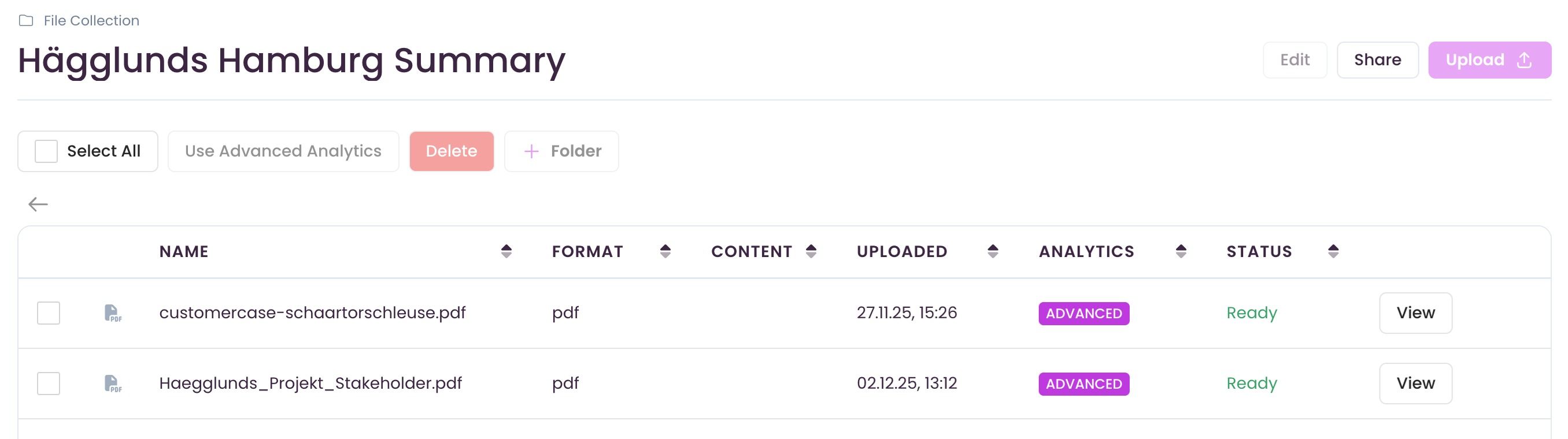
-
If the allowance is used up, you can still upload documents and chat with them. For the best possible response quality, it is advisable to have these documents analysed after the allowance resets or after buying more pages. To do this, use the following button in the file manager:

-